Fleet maintenance that shows whether a truck can go
Due dates, documents, repairs, tyres and brakes for every tractor unit and trailer in one report — linked to orders, costs and telematics.
The fleet maintenance module in intelit.ai is where the fleet manager and the workshop keep track of everything that decides whether a vehicle can set off: roadworthiness tests, tachograph calibration, oil changes, insurance policies, ATP/FRC certificates, repairs, tyres and brakes. Every tractor unit and every trailer has its own report, which opens with a single answer — roadworthy, needs attention or not roadworthy — and below it shows what that assessment is based on.
The module is not a separate workshop program that has to be reconciled by hand with the TMS. It works on the same vehicles, drivers and costs as the rest of the system. The cost of a completed repair goes into the truck's costs, a defect reported by a driver at vehicle handover lands on the workshop's list, and mileage, fuel consumption and vehicle fault codes arrive from telematics. So the planner scheduling the truck for tomorrow and the mechanic who has it over the pit are looking at the same status.
Vehicle report: one page instead of five spreadsheets
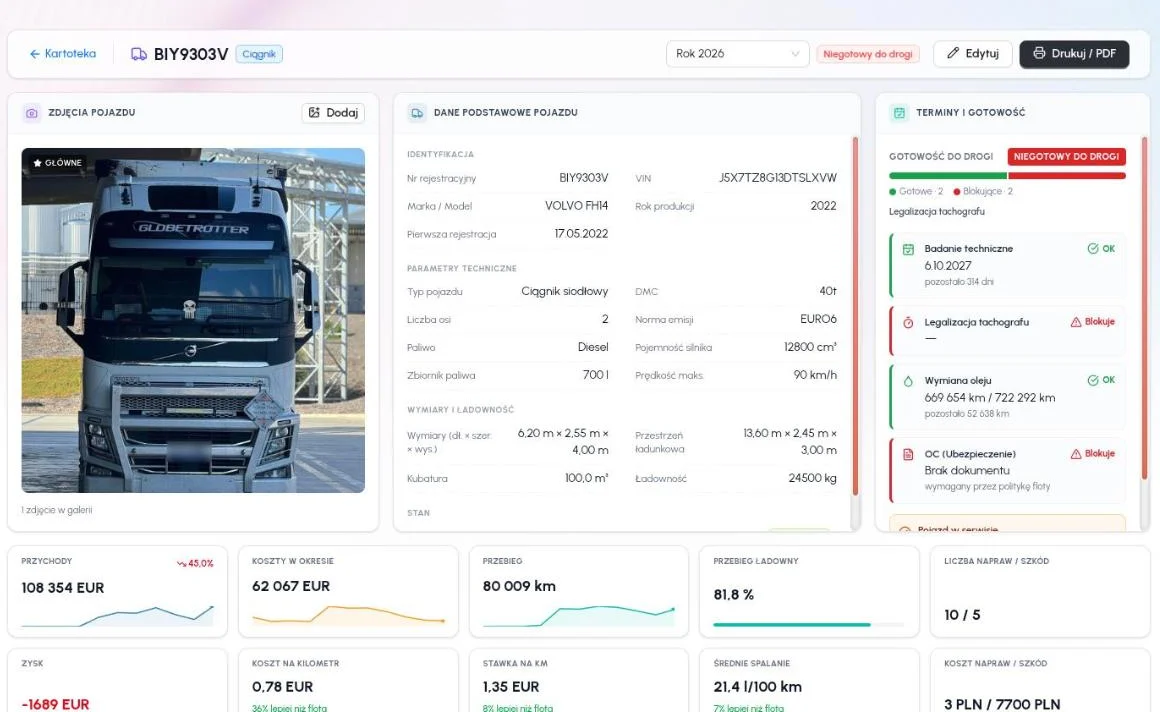
The report for a tractor unit or trailer brings together on one page data that usually sits in several places: the vehicle record with VIN and photos, due dates and their status, documents with expiry dates, costs over the chosen period, repair history, damage, tyres and telematics data. The report period is switched with a single choice — current year, last twelve months or previous year — and every figure on the page is calculated for the same range.
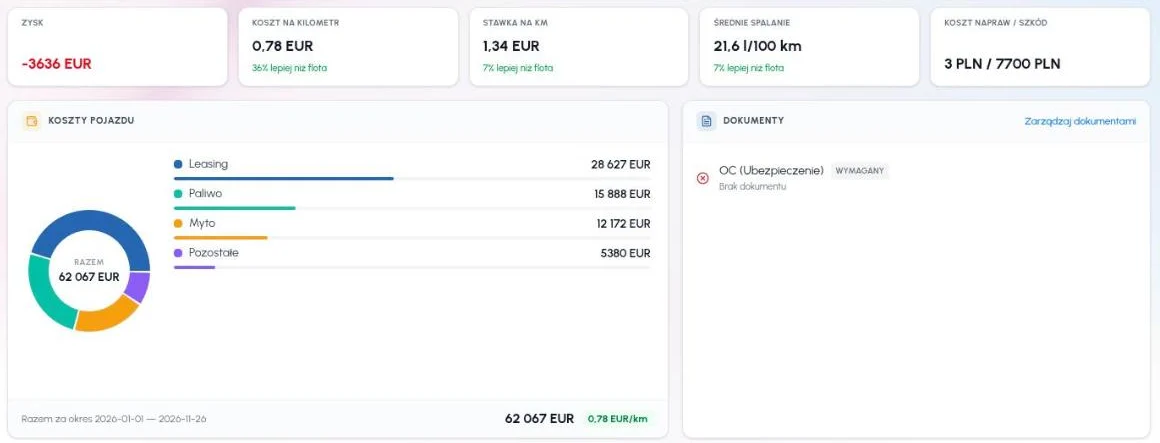
The indicator bar shows costs for the period, mileage, loaded mileage, number of repairs and damage cases, cost per kilometre and — for tractor units whose profitability statistics have been calculated — revenue, profit, rate per kilometre and average fuel consumption. Costs are split into groups on a chart, and a separate chart shows costs, revenue and mileage month by month. The last card, “Vehicle DNA”, sums the truck up in numbers: running costs, revenue, profit, loaded and empty mileage.
- vehicle record with photos, VIN and notes
- costs for the period split into groups, with cost per kilometre
- month-by-month trend of costs, revenue and mileage
- full history of workshop repairs and damage for that truck
- position, driver, activity and number of vehicle fault codes from telematics
Roadworthiness calculated from due dates, not memory
The roadworthiness assessment takes into account the roadworthiness test, tachograph calibration, oil changes counted in kilometres and required documents, including OC (motor third-party liability), AC (own-damage cover) and OCZ policies with the insurer's name and policy number. Each due date has a status: OK, approaching or urgent. The company sets the warning threshold — thirty days by default — but a due date with fourteen days or fewer left always blocks the vehicle, because at that point it is usually too late to book a test slot without stress.
The same statuses appear in the whole-fleet table and on the alerts tab, separately for vehicles and trailers. A trailer has no engine oil or tachograph, so it does not get alerts that do not apply to it; the ATP/FRC certificate is tracked where the vehicle has an insulated body. After an oil change the alert resets to the next mileage according to the interval set for the company, or a workshop job closes it automatically if it is marked as including an oil change.
Tyres on an axle diagram, with tread and brakes
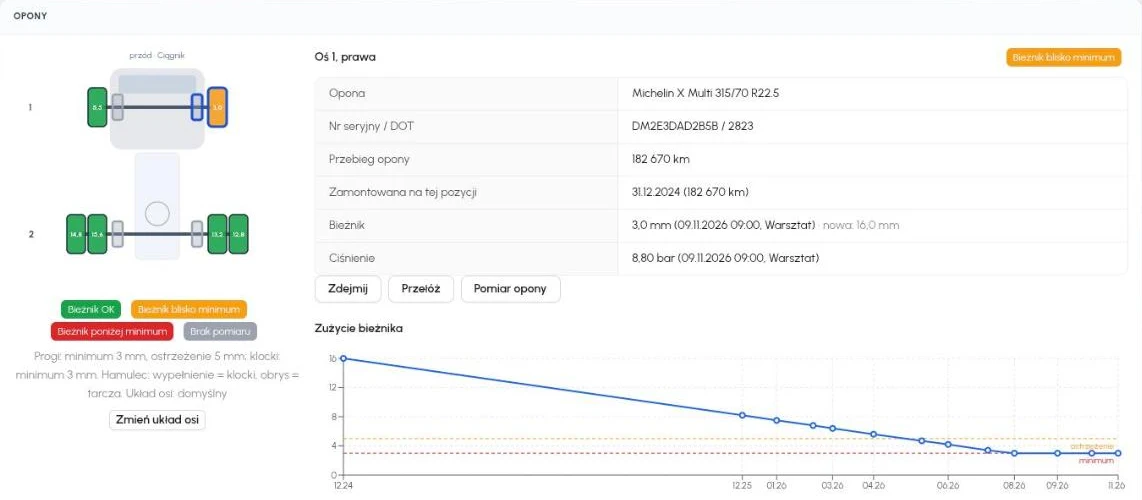
The tyres tab draws the vehicle from above — tractor unit, rigid truck, van or trailer — with its real axle layout, including twin wheels. Each tyre is coloured according to the latest tread measurement: within limits, close to minimum, below minimum or not measured. Next to each wheel you can also see the condition of pads and discs, or for drum brakes the linings and drum, in millimetres. Clicking a position opens the fitting and measurement history and a chart of tread wear over time.
From the same tab you fit a tyre from stock, remove it with a reason, move it to another position or record a tread and pressure measurement with a photo. A measurement can come from an inspection, the workshop or telematics; for trailers with pressure sensors the system shows the sensor readings. The company sets its own alert thresholds — minimum and warning tread depth, tyre mileage limit, minimum pad and disc thickness — and the alert list collects the tyres and brakes that have crossed them.
- axle diagram with each tyre coloured by tread depth
- pads and discs, or linings and drum, at every wheel
- fitting, removal, repositioning and measurement with a photo
- tread and brake wear chart with minimum thresholds
Tyre and parts stock
Every tyre has its own stock record: brand, model, size, serial number, DOT code, price, invoice number and tread depth when new. The status says where the tyre is — in stock, fitted, being retreaded or scrapped — and its mileage is built up from successive fittings. That tells you which tyres wear fastest and how many kilometres a particular tyre covered before it went for retreading.
Alongside it is the workshop parts store, with minimum stock levels and a shortage list. Parts can be booked in manually, from an invoice file from which a language model tries to read the line items — and if it cannot, it asks for manual entry — or directly from a purchase invoice received through KSeF, Poland's national e-invoicing system, by selecting items and quantities. The same invoice line cannot be booked into stock twice.
Workshop: driver-reported defects and a job board
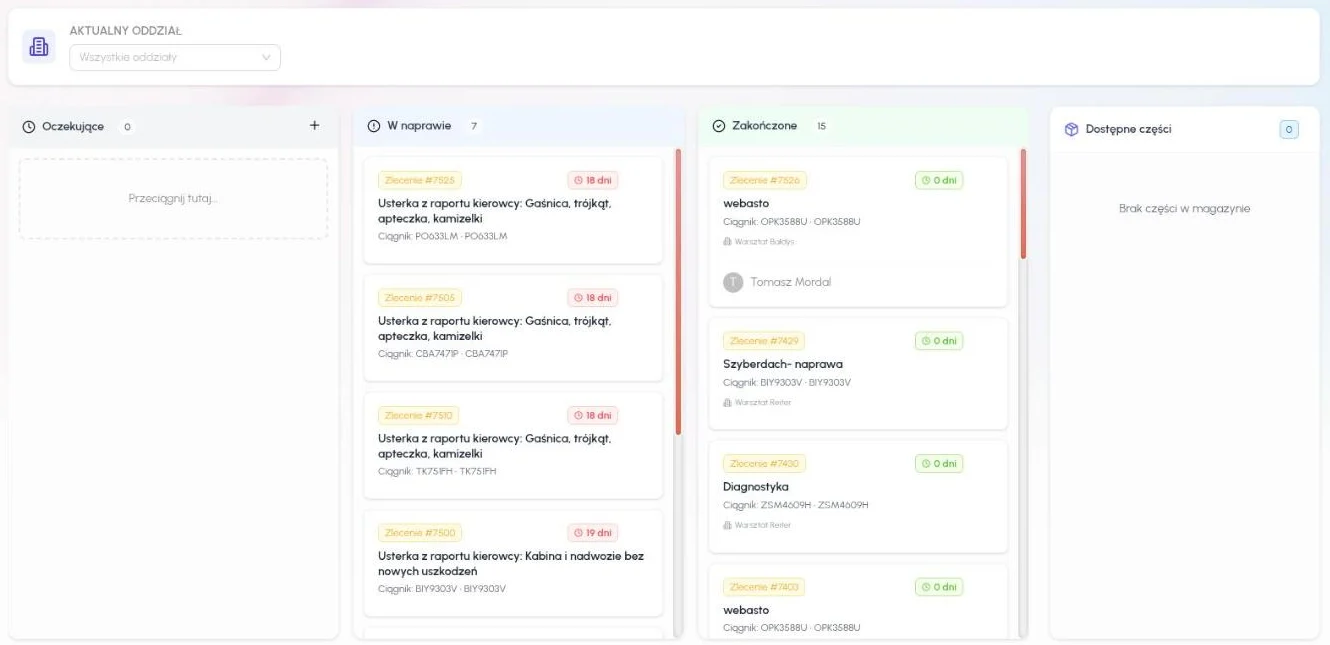
Defects reported by drivers in the app during an inspection or vehicle handover land on a list with severity, description and photo. With one click a defect becomes a workshop job, and the job's status is shown next to the defect. Jobs move across a three-column board — pending, in repair, completed — with priority, mechanic, number of days at the depot and parts allocated from stock.
A job records labour hours and the mechanic's rate, mileage or engine hours at intake, parts and a description of the repair, and once completed its cost is posted to the vehicle. The job can be printed for the mechanic. Companies with several branches run separate workshops, stores and mechanic lists, and bring over repair history from their previous system by importing an Excel file.
Fleet and driver documents with expiry dates
The document register covers registration certificates, lease and rental agreements, insurance policies, ATP/FRC certificates, ADR and EURO certificates and technical supervision (UDT) inspections, and on the driver side the driving licence, driver card, Code 95, medical examinations, driver attestation, work permit and residence card. Every document has an expiry date or is marked as indefinite, and has a scan attached.
The document calendar can be exported to a file, and certificates and licences can be imported from a spreadsheet — the import brings over records and expiry dates, without files. The module does not send anything to test stations or insurers by itself and does not book appointments; its job is to show in good time what needs sorting out and for which truck.
Frequently asked questions
How does the system decide whether a vehicle is roadworthy?
Based on the due dates for the roadworthiness test, tachograph calibration and oil change, and the validity of required documents. An urgent due date, or one with fourteen days or fewer left, marks the vehicle as not roadworthy; a due date within the company's warning threshold marks it as needing attention.
Does the maintenance module cover trailers too?
Yes. Trailers have their own report, documents, tyres on an axle diagram and brakes. They do not get oil and tachograph alerts they have no use for, and for insulated bodies the ATP/FRC certificate is tracked.
Where do tyre tread measurements come from?
The driver enters them during an inspection, the mechanic in the workshop, or they arrive from telematics. Every measurement has a date, mileage and source and can have a photo, and the tyre's colour on the diagram reflects the latest measurement.
Can I set my own alert thresholds?
Yes. The company sets how many days in advance to warn about roadworthiness tests, tachograph calibration and ATP/FRC, the oil change interval in kilometres, and the minimum and warning tread depth, tyre mileage limit and minimum pad and disc thickness.
How does a defect reported by a driver reach the workshop?
A defect from the driver app appears on the defect list with severity and photo. The fleet manager creates a workshop job from it with one click, and the job then moves across the job board until it is completed.
Does the cost of a repair feed into vehicle profitability?
Yes. The cost of a completed workshop job is posted to the vehicle and appears in the vehicle report, in the cost per kilometre and in the fleet cost analysis.
Can I bring over repair history from my current program?
Yes, repair history is imported from an Excel file, and certificates and licences from a spreadsheet. The import brings over records and dates; document scans are added separately.
Does the module book inspections or order parts by itself?
No. It shows due dates, stock shortages and tyre condition in good time, but booking an inspection, ordering parts and deciding to replace a tyre are up to the fleet manager and the workshop.
See the vehicle report on your own fleet
We will show you roadworthiness, due dates, the axle diagram with tyres and brakes and the workshop job board on data similar to yours.
Book a demo