Driver working time records
An obligation that is easy to meet on paper and hard to keep in a way that actually tells you something.
In a haulage company, working time records lead a double life. Formally, they exist to show that the rules were followed. In practice, they determine whether the planner knows how many hours a driver has left until the end of the week, and that is operational information, not archive material.
The difference between the two approaches comes down to timing. Records reconstructed a month later meet the obligation. Records that are up to date on a Friday afternoon stop you sending a driver on a trip they are not legally allowed to finish.
Three sources, one picture
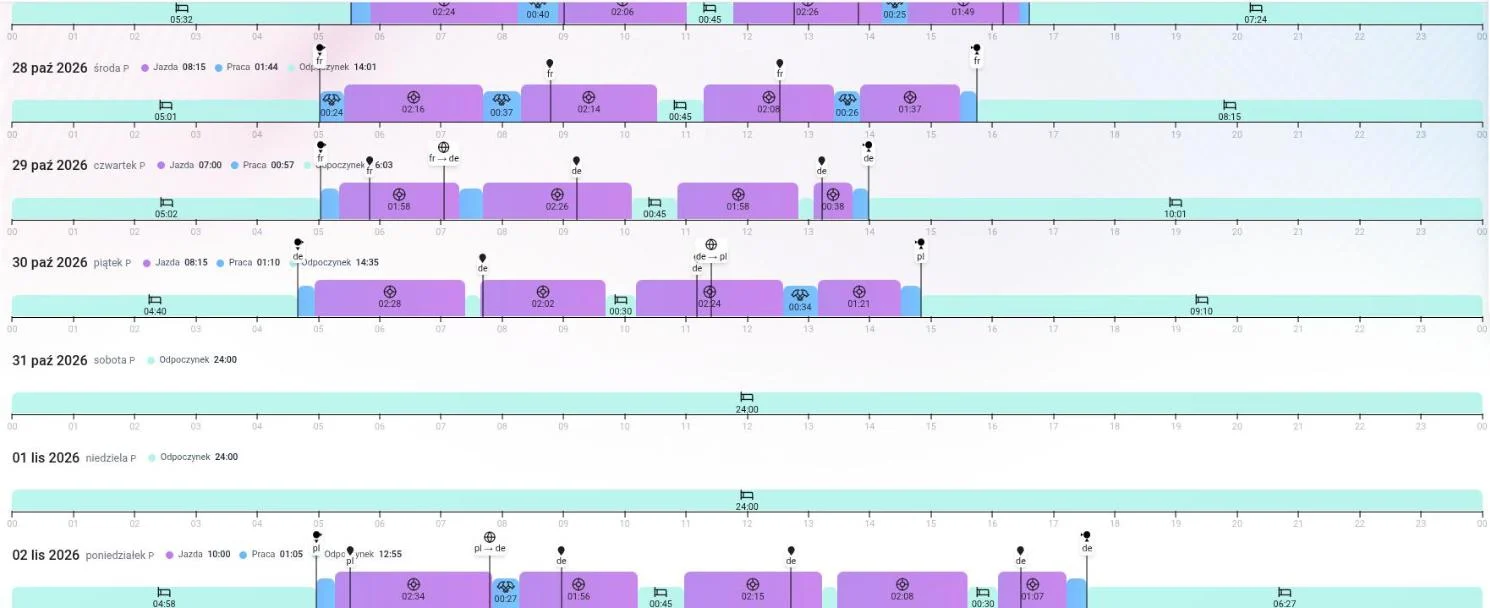
Driver activity data reaches the system from several independent sources: tachograph records, vehicle telematics, and whatever follows from the jobs assigned. Each of them can be incomplete: the tachograph is silent when the card has not been inserted, and telematics cannot tell whether a stop is a rest or a loading.
That is why the sources are combined, not chosen between. Where one covers a gap in another, the picture is more complete; where none of them says anything, the gap stays visible as a gap, not as zero hours.
- tachograph events as the basis of the record
- telematics data as a supplement and cross-check
- gaps flagged explicitly instead of defaulting to zero
Weeks that do not line up with months
The rules on driving time work in weeks, while settlements and reports work in months. It is a small difference that can wreck any summary done by hand, because a week straddling two months has to be split, and fortnightly limits have to be counted across the settlement period.
The system counts weeks according to the applicable calendar standard and shows periods that extend beyond the month. That way the July summary does not lose the week that started on 30 June.
Infringements visible before they become a problem
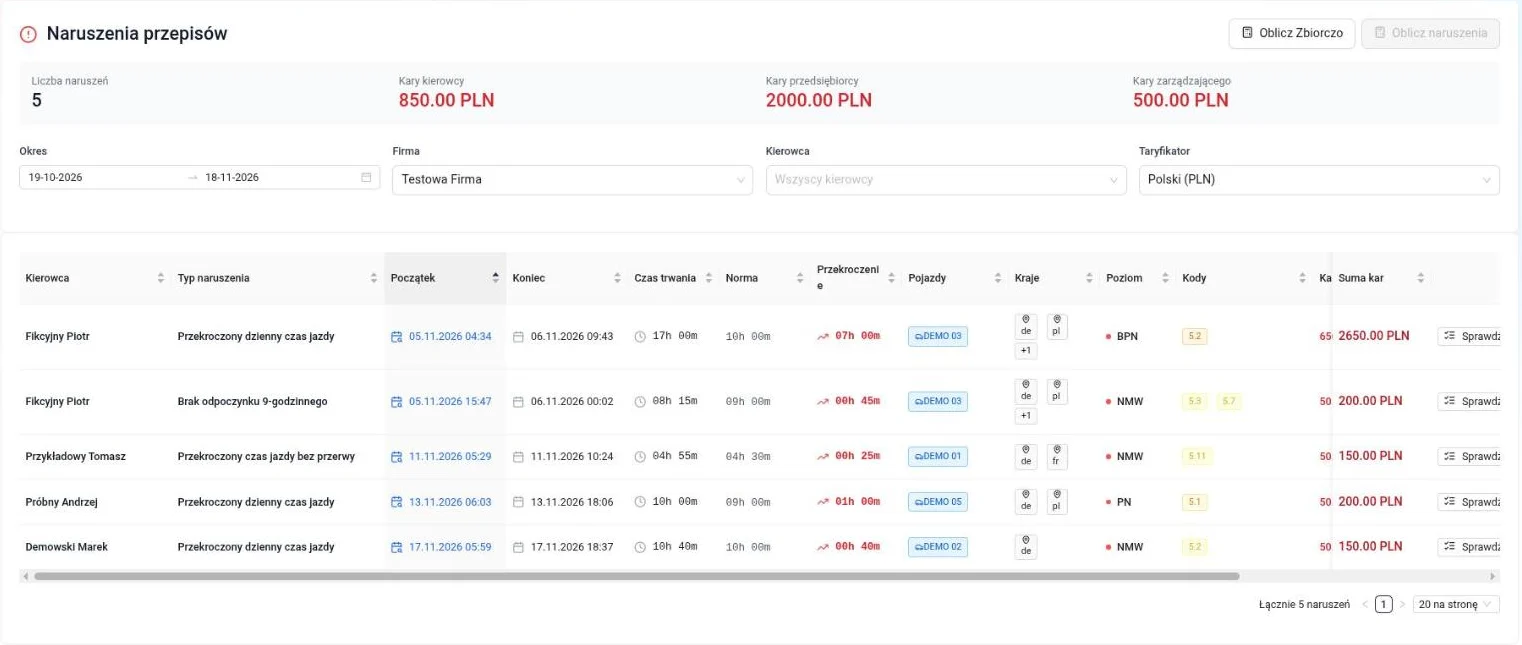
Exceeding daily driving time, a reduced rest, a missed break: companies usually learn about these from one of two sources, an analysis done a month later or an inspection report. Both come too late.
A record kept up to date lets you react while you still can: move a collection, change the driver, plan a rest at a place where it can actually be taken. A fine for an infringement is a one-off cost, but losing a carrier's good repute can be a lasting one.
The link with planning
Working time records and planning are essentially the same data set seen from two sides: looking back and looking ahead. If they live in separate tools, the planner plans based on their own idea of the driver's availability.
When remaining driving time is visible at the planning stage, the question "will they make it?" stops being rhetorical. The planning module uses the same data that will later go into the records.
Completeness matters more than the report
A neat report built on incomplete data is worse than a raw summary, because it gives an impression of order. That is why the first view is not a chart but a list of days with no record and drivers for whom data is missing for the period.
Filling a gap is often simple: the driver forgot the card, drove a vehicle without a tachograph, or was on holiday. The point is that each of these situations gets its own label, rather than looking the same as a day about which nothing is known.
Availability, standby and work other than driving
A driver's working time is not just time behind the wheel. Loading, unloading, waiting at the bay, vehicle checks and periods of availability each have their own classification, and they are what most often goes missing in manually kept records, because the tachograph records them less clearly than driving itself.
The consequences can be costly either way. Under-recording these hours exposes the company in an inspection and in a dispute with an employee, while over-recording raises labour cost for no reason. Separating the categories when the data is collected is cheaper than straightening out the summary afterwards, when nobody remembers whether a three-hour stop was a rest or waiting for the warehouse.
What is left after an inspection
An inspection at a haulage company rarely comes down to a single document. Inspectors check records for specific days, which driver was assigned to which vehicle, and whether the working time records are consistent with the transport documents.
Keeping all of this in one system cuts preparation from days to hours, and above all eliminates the situation where two documents from the same company say different things about the same day.
Frequently asked questions
Does the system replace tachograph analysis software?
Not in every respect. It focuses on working time records and on putting the data to operational use, in planning and settlements. Many companies run detailed infringement analysis in a specialist tool, and the two can be connected.
Where does the data come from if the company has no telematics?
From tachograph records and assigned jobs. Telematics improves accuracy and reduces manual additions, but it is not a prerequisite for keeping the records.
How long do the records have to be kept?
The period follows from the regulations on drivers' working time and on employee documentation. The system stores records together with their source, so you can see not only the result but also where it came from.
What about self-employed drivers?
The rules on driving time and rest apply regardless of the form of employment, so activity is recorded in the same way. What differs is what happens to the data afterwards, at settlement.
Can I see how much driving time a driver has left today?
Yes, and that is the main reason to have the data up to date rather than once a month. Driver availability is visible when the next job is being planned.
Does waiting at the loading bay count as working time?
Waiting for loading or unloading is classified differently from driving and differently from rest, and how it is counted depends on whether the driver could freely dispose of their time. The system separates these categories when the data is collected, so they do not have to be reconstructed a month later.
What if a driver drove another company's vehicle?
That day stays in the driver's records, but without a link to a vehicle in your own fleet. The system flags it as needing completion rather than leaving it out.
Check how complete your data is
We start by showing how many days in a chosen month lack a full record; it is usually the most concrete piece of information in the whole demo.
Book a demo