Orders and document workflow
The whole order file in one place, rather than scattered across the inbox, a shared drive and a ring binder in the office.
A transport order arrives in whatever form the customer chooses: as a PDF attachment, in the body of an e-mail, as a message from a freight exchange, sometimes as a photo of a sheet of paper. Then it gathers documents — the order confirmation, the consignment note, photos from the loading dock, the invoice, a credit note.
Administrative work in freight forwarding largely consists of moving these things from one place to another and making sure none of them goes missing. That, as it happens, does not need to be done by hand.
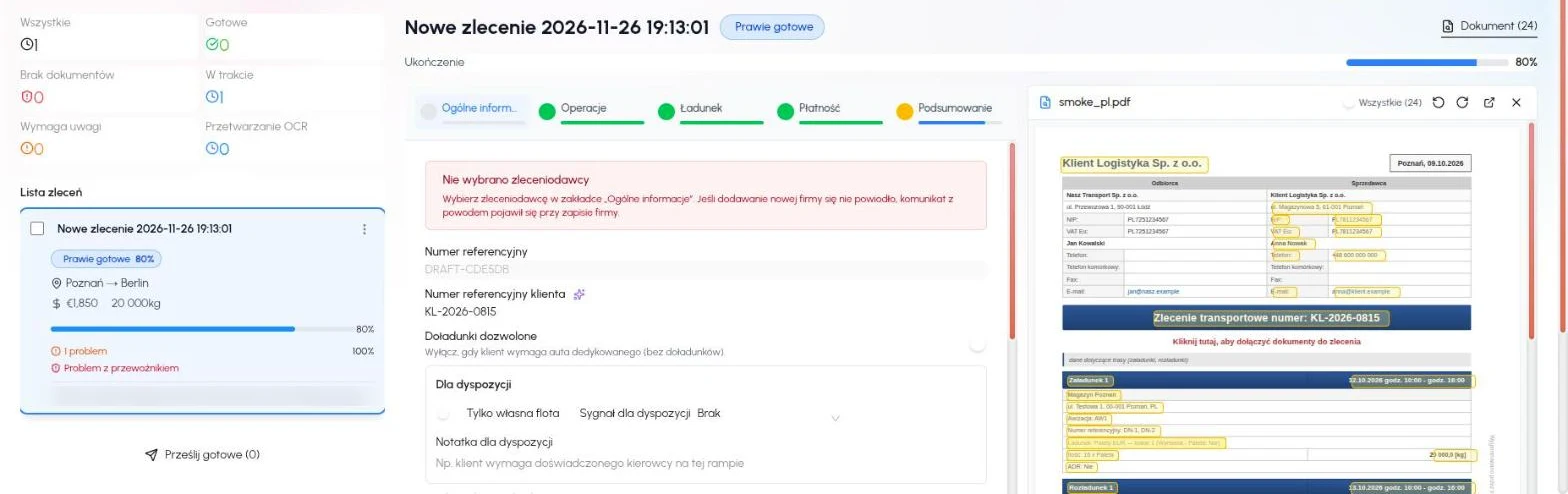
Entering an order without retyping
The Order Agent reads the message or attachment and fills in the form: loading and unloading places and times, a description of the goods, vehicle requirements, the agreed rate and currency. It matches the customer to your records by tax ID and name.
A person approves rather than types. The values read sit next to the original document, so checking them takes a glance rather than comparing two windows. Nothing is saved without confirmation.
- reads PDFs, e-mail bodies, freight exchange messages and photos
- matches the customer to existing records instead of creating a duplicate
- spots when the same order has come in through two channels
Order file completeness, visible at all times
Every job comes with a particular set of documents, and a gap usually surfaces at the worst possible moment — at invoicing, or during a claim weeks after delivery, when nobody remembers the details any more.
The system knows what is still missing for a given order and shows it as a list rather than a surprise. A missing document can be chased while the driver still remembers the route and the consignee still answers the phone.
Documents from the road file themselves
The driver photographs the consignment note on their phone once the consignee has signed it. The system recognises which job the document belongs to and attaches it to the order — no file naming, no e-mail to the office, and no stage at which someone sorts it by hand.
This one habit changes more than most of the system's features, because it moves the moment the paperwork is complete from “once the truck is back at base” to “on the day of delivery”.
Finding instead of searching
Documents attached to an order can be found by job number, customer, date, registration and the customer's own order number. Putting together the paperwork for a single job takes a matter of seconds.
The value shows during an audit and in a dispute — situations where time to respond is limited and the quality of the documentation decides the outcome. The rest of the time it simply means peace of mind.
Carrier orders on your own template
The order you pass on to a carrier is generated from the customer order data, on your template and with your terms. Numbering is continuous, and the variables — load details, dates, rate — are filled in automatically.
Add to that something easily overlooked when comparing systems: a document sent to a carrier is stored in the version in which it was sent. A later change of terms does not overwrite the history.
Counterparty checks when the order is created
A new counterparty is the cheapest moment to check who you are dealing with. The system fetches registration data automatically, so your records do not depend on what someone copied from an e-mail — and that alone eliminates a good share of later problems with invoices rejected because of a wrong tax ID.
For carriers there is also a check of operating licences and insurance policies. The company decides whether an incomplete set blocks the carrier order or merely requires conscious confirmation recorded in the history — imposing one rule on everyone would ignore what work looks like with an urgent load on a Friday afternoon.
Documents and invoices after KSeF
A structured invoice in KSeF, Poland's national e-invoicing system, does not accept attachments, so the consignment note no longer travels with it. A customer who makes payment conditional on receiving the CMR has to get it separately — and that has raised tidy transport paperwork from a convenience to a condition of getting paid smoothly.
When the transport documents are complete on the order, sending them through a separate channel or sharing them by link takes one click. When they sit in an inbox, it is a fifteen-minute task — multiplied by the number of invoices each month.
The customer's order number on everything that goes back to them
Every major customer runs its own numbering and expects to see it on the invoice, on the proof of delivery and in correspondence. For a forwarder serving a dozen or so such customers, that means a dozen parallel referencing systems to remember and apply by hand.
The customer's reference number is stored on the order and filled in wherever it needs to appear. It sounds like a detail until you count the invoices bounced for lack of the right number — and every one of them is a delayed payment.
Frequently asked questions
What happens if a document is read incorrectly?
The values read are a suggestion in the form, displayed next to the original. A correction means changing one field, not re-entering everything. The system does not save a value a person has not approved.
Does the system read orders from freight exchanges?
Yes, alongside e-mails and attachments. The scope depends on which exchanges the company has access to and what data they provide.
Can I enter an order agreed over the phone?
Yes, by hand and straight after the call. The confirming document can be attached later — the creation date and agreed terms are recorded at the moment of entry.
How long are documents kept?
For the period required by law and by your contracts. Documents stay linked to the order, so the archive is not a separate folder of files but the history of your jobs.
Can a customer get access to the documents for their job?
Yes, limited to that one job and without access to the rest of the system. It is the simplest way to pass on the CMR now that invoices no longer accept attachments.
Can carrier orders be issued on our own template?
Yes, together with your own numbering, terms and logo. The version sent is archived exactly as it reached the carrier.
What about documents that arrive on paper?
They are scanned or photographed, and the system recognises which job they belong to. Paper still circulates, but it stops being the only place where the information exists.
Let's walk through one of your orders
From the e-mail with the load to a complete job file — using an example close to what you do every day.
Book a demo